.jpg)
I've been using HTTPS every day for years. I see the padlock icon in the browser, I know "this site is secure," and I move on with my life. It works. I don't think about it.
Then someone asked me how HTTPS actually works. Not "what does HTTPS do" - I knew that. Encrypts data. Secure connection. But how. How does your browser know a certificate is real? How does encryption get set up? Why can't a hacker just... make their own certificate?
I couldn't answer any of it.
A few weeks ago I wrote about how DNS works - how a domain name gets resolved to an IP address. That covers the first half of what happens when you type a URL. But after your browser finds the server, there's this whole other process that happens before a single byte of your actual data gets sent. That's what this post is about.
SSL vs TLS - Quick Clarification
Before we get into it, you'll see me say "SSL" and "TLS" in this post. They're related but not the same thing.
SSL (Secure Sockets Layer) was the original protocol for encrypting web traffic. It was created by Netscape back in the mid-90s. SSL 3.0 was the last version, and it's been officially deprecated since 2015 because of security vulnerabilities.
TLS (Transport Layer Security) is the replacement. TLS 1.2 and TLS 1.3 are what your browser actually uses today. TLS 1.3 is the latest and fastest - it cut the handshake down to a single round trip.
But here's the thing - everyone still says "SSL certificate." It's technically a TLS certificate, but the old name stuck. Kind of like how people still say "roll down the window" even though car windows are electric now. Throughout this post, when I say SSL, I mean TLS. When I say SSL certificate, I mean TLS certificate. Same thing.
The Problem HTTPS Solves
HTTP sends everything in plain text. Your password, your credit card number, your messages - all of it travels across the internet as readable text. Anyone sitting in the middle (the WiFi owner at that coffee shop, your ISP, an attacker on the network) can read every single thing you send and receive.
HTTPS fixes this with two things: encryption and identity verification.
Encryption scrambles your data so interceptors see garbage. To see what I mean, imagine you're logging into a website. With HTTP, anyone on the network can see exactly what you're sending:
--- HTTP (plain text) ---
POST /login HTTP/1.1
Host: example.com

username=manish&password=MySecretPass123
Your password. Right there. Readable by anyone. Your ISP, that person next to you at the coffee shop, anyone running a packet sniffer on the network.
With HTTPS, the same request looks like this to an interceptor:
--- HTTPS (encrypted) ---
17 03 03 00 9A 2B 5E 8C F1 A3 7D 22 0E B8 4A 91
C6 3F D7 18 55 6B A0 E4 9C 72 1D 83 F5 0A 6E B9
3A 87 C1 4F D6 2E 59 7B A8 E0 1C 63 F4 0B 5D 92...
Complete gibberish. Even if someone intercepts every single packet, they can't read any of it.
Encryption without verification is useless. You need to know who you're talking to before you start sharing secrets.
But encryption alone isn't enough. If you encrypt your credit card number and send it to a hacker who's pretending to be Amazon, encryption didn't save you. You encrypted it perfectly - and delivered it straight to the wrong person. This is where SSL/TLS certificates come in. They prove that the website you're talking to is actually who it claims to be.
What Is a Certificate Authority?
A Certificate Authority (CA) is a trusted organization that vouches for websites. Think of it like a notary public. When Spotify wants to prove it's really Spotify, it doesn't just say "trust me." It gets a certificate signed by a CA that your browser already trusts.
Some well-known CAs: Let's Encrypt (free, and by far the most popular), DigiCert, Cloudflare, Google Trust Services.
Your browser ships with a pre-installed list of around 150 trusted root CAs. Chrome, Firefox, Safari - they all maintain their own lists. If a certificate is signed by a CA that's not on the list, your browser won't trust it. The browser makers essentially decide which CAs are trustworthy enough.
How a Website Gets a Certificate
Let's say Spotify wants HTTPS. Here's what actually happens:
Spotify generates a key pair - a private key (secret, stays on Spotify's servers, never shared) and a public key (can be shared with anyone).
Spotify then sends a Certificate Signing Request (CSR) to a CA like DigiCert. The CSR contains the domain name (spotify.com) and Spotify's public key.
DigiCert needs to verify that whoever sent this request actually owns spotify.com. This is called Domain Control Validation (DCV), and CAs typically offer three ways to do it:
- DNS method - Add a specific TXT record to your DNS settings. Only the real domain owner can modify DNS records - if you've read my DNS post, you know what TXT records are. This is the most common method.
- Email method - Respond to a verification email sent to an address like
[email protected]. If you can receive email on the domain, you probably own it. - HTTP method - Upload a specific file to a specific path on your web server (something like
spotify.com/.well-known/pki-validation/). If you can put files on the server, you control the domain.
Spotify picks one, proves ownership, and DigiCert is satisfied. Now DigiCert creates a certificate containing: the domain name, Spotify's public key, the issuer (DigiCert), and an expiry date. Then DigiCert signs this certificate with their own private key - takes a hash of the certificate data and encrypts that hash with DigiCert's private key. That encrypted hash is the digital signature. DigiCert sends the signed certificate back, and Spotify installs it on their server.

That's it. Spotify now has a signed certificate that any browser in the world can verify.
What's Actually Inside a Certificate
I kept saying "the certificate contains the domain name and public key" like that's all there is. It's not. A real certificate has a lot more information packed into it. I opened open.spotify.com in my browser, clicked the padlock icon, and looked at the actual certificate. This is what's inside:
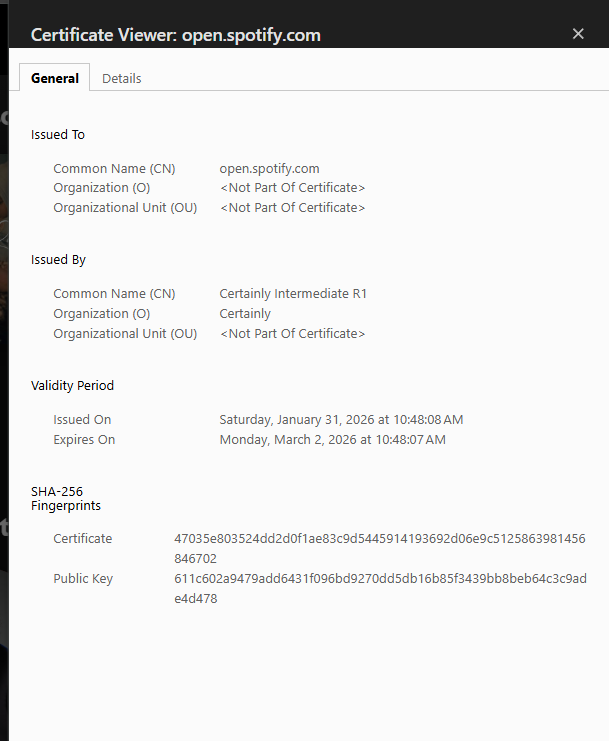
A few things worth noting. The Issuer is "Certainly Intermediate R1" - that's the intermediate CA that signed this certificate (not a root CA directly, which ties into the chain of trust I'll explain later). The Validity shows this cert only lasts about 30 days - Spotify rotates certificates frequently.
The Subject Alternative Names (SANs) field lists every domain the certificate is valid for. That *.spotify.com is a wildcard, meaning the same certificate covers open.spotify.com, api.spotify.com, and any other subdomain. One certificate, multiple domains.
The Signature Algorithm tells you which hash function and encryption method were used to sign this certificate. SHA256withRSA means the content was hashed with SHA-256 and the hash was encrypted with RSA. You'll see why this matters in a second.
How Signing Works
When I say DigiCert "signs" the certificate, here's what's actually happening under the hood:
- DigiCert takes the certificate content and runs it through a hash function. A hash is like a fingerprint - same input always gives the same output, but even a tiny change produces a completely different result. The hash might be something like
9f2k4m8n3p. - DigiCert encrypts this hash with their private key. The result - let's say
x7#mK9$pL2- is the digital signature. - DigiCert attaches this signature to the certificate.
Only DigiCert can create this signature because only DigiCert has the private key. That's the whole point.
# What the CA does when signing a certificate
certificate_content = "domain=spotify.com, public_key=abc123, expiry=2026-12-31"

# Step 1: Hash the content
hash_value = sha256(certificate_content)  # → "9f2k4m8n3p"

# Step 2: Encrypt the hash with CA's private key
signature = encrypt(hash_value, ca_private_key)  # → "x7#mK9$pL2"

# Step 3: Attach signature to certificate
certificate.signature = signature
How Your Browser Verifies
You type spotify.com in your browser. DNS resolves it to an IP. Your browser connects and the server sends back its certificate with the attached signature.
Now your browser does the reverse:
- It sees the certificate was issued by DigiCert. It finds DigiCert's public key (pre-installed in the browser).
- It decrypts the signature using DigiCert's public key. This gives back the original hash:
9f2k4m8n3p. - It takes the certificate content it just received and hashes it independently. If nothing was tampered with, this also produces
9f2k4m8n3p. - It compares the two hashes.
If they match - the certificate is genuine. Proceed securely. If they don't match - something was tampered with. Show a warning.
# What your browser does when it receives a certificate
signature = certificate.signature
content = certificate.content

# Decrypt the signature with the CA's public key
original_hash = decrypt(signature, ca_public_key)  # → "9f2k4m8n3p"

# Hash the content independently
my_hash = sha256(content)  # → "9f2k4m8n3p"

# Compare
if original_hash == my_hash:
    print("Certificate is genuine. Proceed.")
else:
    print("WARNING: Certificate may be forged!")
"Independently" is the key word here. The browser doesn't trust the hash that came with the certificate. It computes its own. That's what makes the whole thing work.
The Chain of Trust
I simplified something earlier. I said your browser checks the certificate against DigiCert's public key, which is pre-installed in the browser. That's the gist of it, but in practice there's a layer in between.
Root CAs don't directly sign website certificates. Their private keys are way too valuable - if a root key got compromised, every certificate it ever signed would be in question. So root CAs keep their private keys locked away in offline hardware security modules and almost never use them directly.
Instead, the chain works like this: the Root CA signs an Intermediate CA's certificate. The Intermediate CA then signs the actual website certificate. So when your browser receives Spotify's certificate, it actually gets a chain:
- Spotify's certificate - signed by DigiCert's Intermediate CA
- DigiCert Intermediate CA's certificate - signed by DigiCert's Root CA
- DigiCert Root CA's certificate - pre-installed in your browser's trust store
Your browser walks up the chain. Is Spotify's cert signed by the intermediate? Check. Is the intermediate signed by the root? Check. Is the root in the trust store? Check. All links verified.
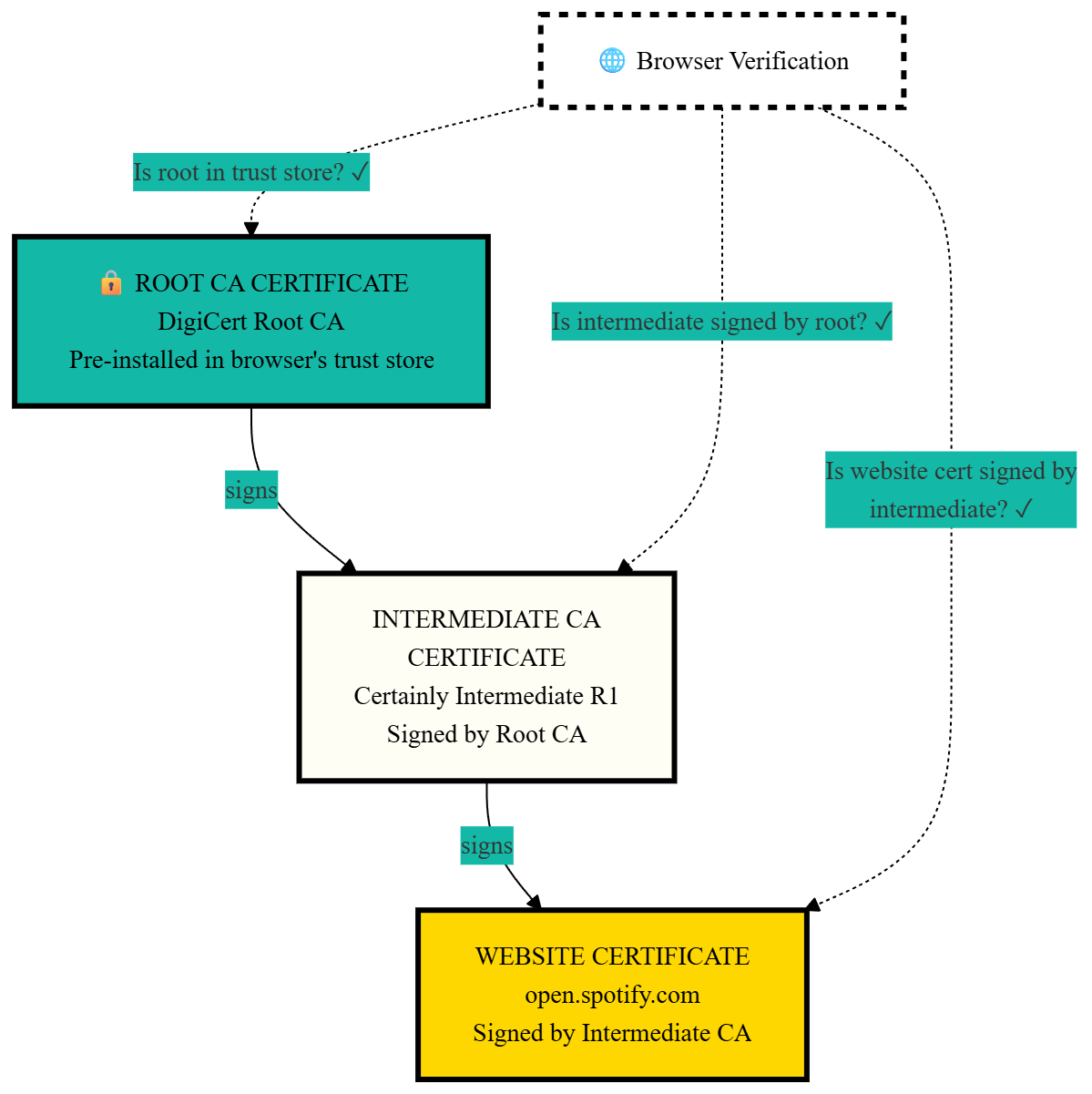
If you've ever set up SSL with Let's Encrypt, you've seen this in action. When Let's Encrypt gives you certificate files, one of them is called fullchain.pem. That file contains your website certificate AND the intermediate certificate bundled together. The server sends both to the browser so it can verify the entire chain. If you've followed my Django deployment guide, you already used this file in your Nginx config.
Why Hackers Can't Fake Certificates
This is the part that confused me the most. A hacker wants to pretend to be spotify.com. They create a fake certificate. Now they need to sign it so browsers accept it. What are their options?
Option 1: Sign With DigiCert's Private Key
Impossible. The hacker doesn't have DigiCert's private key. That key is stored in hardware security modules in secure facilities. Nobody outside DigiCert has access to it.
Option 2: Sign With Their Own Key
They can try. But when your browser decrypts the signature using DigiCert's public key, it'll get garbage. The math doesn't work - a signature created with key A can only be correctly decrypted with key A's corresponding public key, not someone else's. No match. Warning shown.
Option 3: Copy the Signature From the Real Certificate
The hacker grabs Spotify's real certificate and copies its signature onto their fake certificate. Won't work. The fake certificate has different content (the hacker's public key instead of Spotify's), so when the browser hashes the fake content, it gets a different hash. The copied signature decrypts to the old hash. They don't match. Warning shown.
Option 4: Just Guess a Valid Signature
Mathematically impossible. The number of possible signatures is so large that brute-forcing one would take longer than the age of the universe. Not an exaggeration.
Public keys can only VERIFY signatures, not CREATE them. Everyone has the public key - that's by design. But to create a valid signature, you need the private key. And only the CA has it.
The hacker is stuck. Every option is a dead end.
But What If the CA Itself Gets Hacked?
This actually happened. In 2011, a Dutch Certificate Authority called DigiNotar got compromised. Attackers broke into their systems and issued over 500 fake certificates - including ones for google.com, mozilla.org, and intelligence agencies.
These fake certificates were used to intercept the HTTPS traffic of around 300,000 Iranian users. Real man-in-the-middle attacks, against real people, using certificates that browsers considered completely legitimate.
The response was swift. Every major browser revoked trust in DigiNotar entirely. Every single certificate they'd ever issued became untrusted overnight. DigiNotar went bankrupt within months.
This incident is why Certificate Transparency (CT) exists now. CT is a system of public, append-only logs where every certificate issued by any CA gets recorded. Anyone can search these logs. If a CA issues a suspicious certificate for your domain, monitoring services will catch it. Google Chrome actually requires all certificates to be logged in CT before it will trust them.
So yes - the system isn't perfect. CAs can be compromised. But the consequences are catastrophic for the CA, and the industry has added safeguards to make it much harder to pull off undetected.
The HTTPS Handshake
Once the certificate is verified, your browser and the server need to set up encryption. This happens through what's called the TLS handshake. It takes milliseconds, but a lot is happening:
Step 1 - Client Hello: Your browser tells the server "I want a secure connection" and lists the encryption methods it supports (TLS 1.3, TLS 1.2, etc.).
Step 2 - Server Hello: The server picks an encryption method and says "Let's use TLS 1.3. Here's my certificate."
Step 3 - Certificate Verification: Your browser verifies the certificate is genuine using the process I described above.
Step 4 - Key Exchange: The browser generates a random secret, encrypts it with the server's public key (from the certificate), and sends it over. Only the server can decrypt this because only the server has the matching private key. Now both sides have the same shared secret.
Step 5 - Symmetric Encryption Begins: Both sides derive a session key from the shared secret. All further communication is encrypted with this key. Fast symmetric encryption from this point on.

Why Two Types of Encryption?
I kept reading about "asymmetric" and "symmetric" encryption and it felt unnecessarily complicated. Why not just use one type? To understand why HTTPS uses both, you need to know what each one actually does.
Symmetric encryption uses one key. The same key encrypts and decrypts. Think of it like a padlock where both you and your friend have a copy of the same key. You lock the box, send it, they unlock it with their identical key. Simple and fast - like, really fast. AES-256 (the algorithm most HTTPS connections use) can encrypt gigabytes of data per second. Your Netflix stream, your Google searches, your bank transactions - all encrypted with symmetric encryption at full speed.
But there's a problem. How do you and your friend get the same key in the first place? You can't just send it over the internet - if anyone intercepts it, they have the key too. You'd need to meet in person and exchange keys, which obviously doesn't work when your browser needs to talk to a server on the other side of the planet.
Asymmetric encryption solves this. Instead of one shared key, you get a pair: a public key and a private key. They're mathematically linked. Anything encrypted with the public key can only be decrypted with the matching private key, and vice versa. The public key is... public. You can post it on a billboard. It doesn't matter. Without the private key, nobody can decrypt what was encrypted with the public key.
This is how two strangers can communicate securely without ever meeting. The server publishes its public key (in the certificate). Your browser encrypts a secret using that public key and sends it over. Even if an attacker intercepts it, they can't decrypt it - only the server's private key can do that. Now both sides have the shared secret, and they never had to exchange it insecurely.
The downside? Asymmetric encryption is slow. Really slow. RSA operations can be hundreds of times slower than AES. You wouldn't want to encrypt every single packet of a Netflix stream with it.
So HTTPS uses both. Asymmetric encryption to safely exchange a shared secret between two parties who've never talked before. Then symmetric encryption (using that shared secret as the key) for all actual data from that point on. Fast, secure, and no chicken-and-egg problem.
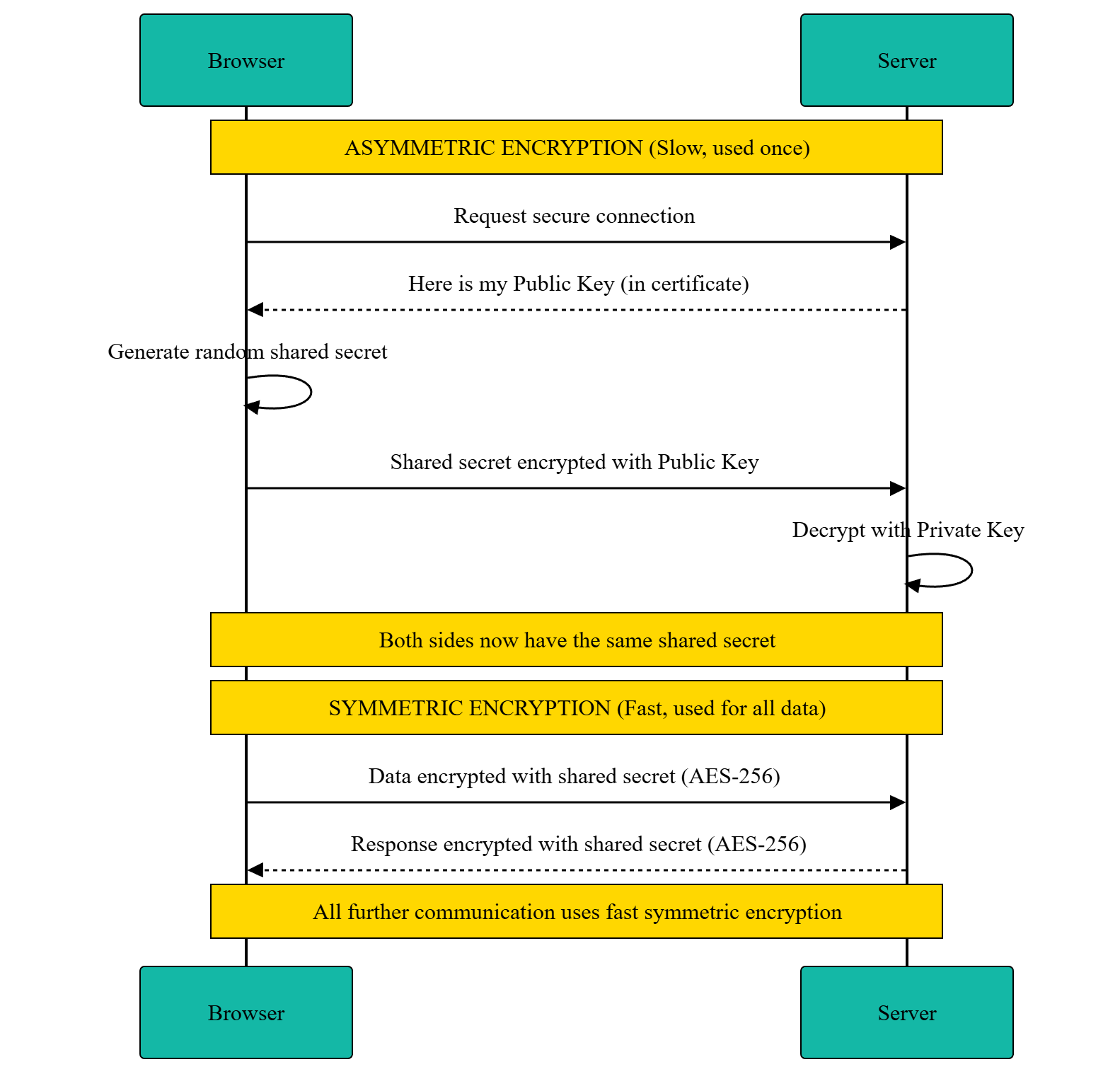
Use the slow secure method once to set up a shared secret. Then use the fast method for all actual data. That's the whole trick.
When Verification Fails
You've seen the "Your connection is not private" page in Chrome. Now you know what's actually going wrong behind the scenes. It's one of these:
- Certificate expired - Let's Encrypt certificates last 90 days. If the site admin forgot to renew (or their auto-renewal broke), the certificate is dead. This happens more often than you'd think.
- Wrong domain - The certificate says
spotify.combut you're onsp0tify.com. The domain in the certificate doesn't match the domain you're visiting. - Self-signed certificate - Someone generated their own certificate without going through a trusted CA. The browser has no way to verify it. Common on local development servers.
- Unknown CA - The certificate was signed by a CA that's not in the browser's trust list.
- Certificate revoked - The CA explicitly revoked the certificate, usually because the private key was compromised.
Don't bypass these warnings unless you know exactly what you're doing. They exist because something in the trust chain broke.
HSTS and Mixed Content
Two more things that are directly related to HTTPS and worth knowing about.
HSTS (HTTP Strict Transport Security)
When you visit a site that uses HSTS, the server sends back a header like this:
Strict-Transport-Security: max-age=31536000; includeSubDomains
This tells your browser: "For the next year (31,536,000 seconds), always use HTTPS for this domain. Even if the user types http://, upgrade it to https:// automatically before making the request."
Without HSTS, there's a window of vulnerability. The first time you visit a site by typing http://example.com, an attacker could intercept that initial HTTP request and redirect you to a fake site before the server gets a chance to redirect you to HTTPS. This is called an SSL stripping attack. HSTS closes that gap - after your first visit, your browser won't even try HTTP.
If you've read my guide on deploying Django REST Framework, you already saw this exact header in the Nginx configuration.
Mixed Content
You loaded a page over HTTPS. The page is secure. But the HTML includes a script tag loading from http://cdn.example.com/script.js - plain HTTP. That script isn't encrypted. An attacker could modify it in transit, injecting malicious code into your otherwise secure page.
Browsers handle this by blocking or warning about mixed content. If your HTTPS page tries to load images, scripts, or stylesheets over HTTP, the browser either blocks them entirely (for scripts and iframes) or shows a warning (for images). If you're a developer and your site has mixed content warnings, the fix is simple - make sure all your resource URLs use https://.
Try It Yourself
Everything I described above isn't theoretical. You can see it right now in your browser.
In Chrome, click the padlock icon (or the tune icon) next to the URL. Click "Connection is secure" then "Certificate is valid." You'll see the actual certificate - the issuer, validity dates, Subject Alternative Names, all of it. Try it on google.com and look at how many domains are listed in the SANs.
You'll see the actual issuer, validity dates, Subject Alternative Names - everything I described in this post. Try it on a few different sites and compare. Some certificates cover dozens of domains in their SANs. Some expire in 30 days, others last a year.
Some Questions I Had
While learning all this, I kept running into the same few questions. If you're thinking the same things, here's what I figured out.
What does "browser hashes independently" actually mean?
The certificate has two parts: the content (domain, public key, expiry, issuer info) and the signature.
The signature is just the hash of the content, encrypted with the CA's private key. When the browser receives the certificate, it gets the original hash by decrypting the signature with the CA's public key. Then it takes the certificate content it received and runs the same hash function on it. "Independently" means the browser is doing its own math - not trusting what the server or anyone else claims the hash should be.
If a hacker modified the certificate content (swapped in their own public key, for example), the hash would change. The decrypted signature would say 9f2k4m8n3p but the browser's independent calculation would say 7x9pqr2m1k. No match. Tampered.
Does this happen every single time I visit a site?
The full handshake happens on the first connection. After that, TLS has a session resumption feature - the browser and server can reuse the previously negotiated session parameters, skipping the expensive certificate verification and key exchange. This is why the first page load feels slightly slower than subsequent ones.
If you close the browser and come back later, a new handshake happens. But browsers cache session tickets for a short time, so reconnecting within a few minutes is usually fast. Certificates themselves are typically cached too.
And certificates expire. Let's Encrypt issues them for 90 days. Other CAs go up to a year. After expiry, the website needs a new one.
Hackers have the public key too. So what stops them?
Yes, hackers have the public key. Everyone does. It's literally public.
But public keys can only decrypt signatures - they can't create them. Think of it like a wax seal. DigiCert's private key is the stamp that creates the seal. The public key is a mold that lets you check if a seal is genuine. Everyone has the mold. Only DigiCert has the stamp.
With the public key, a hacker can verify existing signatures. That's it. They can confirm "yep, DigiCert signed this." Completely useless for attacking anything.
To create a new valid signature, you need to encrypt the hash with the private key. The hacker doesn't have it. If they try to encrypt with the public key instead, the math breaks - decrypting a public-key-encrypted value with the same public key doesn't produce a valid result.
The math only works one way: private key encrypts, public key decrypts. That's asymmetric cryptography. The public key being public isn't a vulnerability. It's the entire design.
What's the difference between DV, OV, and EV certificates?
Not all certificates are created equal. There are three levels of validation:
- DV (Domain Validation) - Only proves you own the domain. This is what Let's Encrypt gives you. The CA checks DNS records or sends an email to the domain owner. Takes seconds. Free or cheap. Sufficient for most websites.
- OV (Organization Validation) - Also verifies that your organization legally exists. The CA checks business registration documents. Takes a few days.
- EV (Extended Validation) - The most thorough. The CA does extensive verification of the business - legal existence, physical address, operational status. Used to show a green bar in browsers with the company name, but most browsers removed that visual distinction.
The encryption is identical for all three. A DV certificate encrypts your data just as well as an EV certificate. The difference is only in how much identity verification was done. For personal sites and most businesses, DV is more than enough.
Can my employer or school see my HTTPS traffic?
On your personal device and personal network - no. HTTPS encryption means nobody in the middle can read your data.
But on a company laptop or school computer - possibly yes. Organizations can install their own root CA certificate on devices they manage. Once their CA is in the trust store, they can issue certificates for any domain. Your laptop connects to gmail.com, but instead of getting Google's real certificate, it gets one signed by your company's CA. Your browser trusts it because the company's root CA is in the trust store.
This is called TLS interception (or MITM inspection). The company's proxy server decrypts your traffic, inspects it for security threats, and re-encrypts it before sending it on. It's legal on devices the organization owns. Most corporate security policies mention this, even if nobody reads them.
On your personal devices, nobody can do this unless they've physically installed a root CA on it. So no, your ISP can't read your HTTPS traffic. They can see which domains you're visiting (through DNS queries and the SNI field in TLS), but not the actual content.
I use HTTPS every day. Now I actually know what happens between typing a URL and seeing that padlock icon. The whole security model boils down to one principle: private keys create, public keys verify. Without the private key, you can't forge anything. With the DNS knowledge from my last post and this, I now understand the full chain - from domain name to IP address to verified, encrypted connection.